Tag 10: Longhorn
Ziel: Longhorn aus Ranchers Katalog auf werk installieren, Postgres auf ein repliziertes Volume umziehen und beweisen, dass die Datenbank jetzt den Node wechseln kann. · Dauer: ca. 90 min · Voraussetzung: Tag 9
Briefing
- Longhorn ist der Speicher von Rancher: Jedes Volume liegt als Replikas auf mehreren Nodes. Fällt ein Node weg, hängt Longhorn das Volume auf einem anderen an.
- In „Kubernetes zum Anfassen”, Tag 14, saß
db-0auf local-path fest: Drain des Nodes hieß Ausfall bis zumuncordon. Genau das ändert sich heute. - Longhorn nutzt iSCSI. Auf jedem Node muss der Dienst
iscsidlaufen. - Die StorageClass eines StatefulSets lässt sich nicht nachträglich ändern. Der Umzug braucht deshalb ein Backup und eine Neuinstallation.
 Node werk1            Node werk2            Node werk3
 ┌──────────────┐      ┌──────────────┐      ┌──────────────┐
 │ Replika  ◄───┼──────┼─► Replika    │      │              │
 │   ▲          │      │              │      │ db-0 (neu)   │
 └───┼──────────┘      └──────────────┘      └──────┬───────┘
     └──────── Longhorn-Engine hängt das Volume dort an, wo db-0 läuft
Drill 1: Voraussetzungen
source ~/rancher-lab/setup/env.sh
mkdir -p "$LAB/tag10" && cd "$LAB/tag10"
for n in werk1 werk2 werk3; do
  multipass exec "$n" -- sudo systemctl enable --now iscsid
  echo "$n: $(multipass exec "$n" -- systemctl is-active iscsid)"
done
Erwartet:
werk1: active
werk2: active
werk3: active
open-iscsi ist in den Ubuntu-Images schon installiert,
nur der Dienst schläft. Ohne ihn meldet Longhorn seine Nodes als nicht
bereit.
Fortschritt speichern? Kostenlos registrieren
Drill 2: Longhorn aus dem Rancher-Katalog
Longhorn steht in Apps › Charts des Clusters werk,
aus dem Repo rancher-charts. Rancher pflegt dort eigene,
getestete Versionen:
export KUBECONFIG="$LAB/kube/rancher.yaml"
ID=$(kubectl -n fleet-default get clusters.provisioning.cattle.io werk \
  -o jsonpath='{.status.clusterName}')
H="Authorization: Bearer $(cat "$LAB/rancher-token")"
API="https://rancher.$RANCHER.sslip.io/k8s/clusters/$ID/v1"
API+="/catalog.cattle.io.clusterrepos/rancher-charts"
curl -sk -H "$H" "$API?link=index" \
  | jq -r '.entries.longhorn[0:2][] | "\(.version) app \(.appVersion)"'
Erwartet:
110.1.0+up1.12.1 app v1.12.1
110.0.0+up1.11.3 app v1.11.3
Die Rancher-Versionsnummer 110.1.0 beginnt mit der
Rancher-Generation, up1.12.1 nennt die Longhorn-Version
dahinter. Installiert werden zwei Charts, erst die CRDs, dann Longhorn
selbst, mit zwei statt drei Replikas pro Volume für die kleinen VMs:
curl -sk -X POST -H "$H" -H 'Content-Type: application/json' "$API?action=install" \
  -d '{"charts":[
        {"chartName":"longhorn-crd","version":"110.1.0+up1.12.1",
         "releaseName":"longhorn-crd","values":{}},
        {"chartName":"longhorn","version":"110.1.0+up1.12.1","releaseName":"longhorn",
         "values":{"persistence":{"defaultClassReplicaCount":2},
                   "defaultSettings":{"defaultReplicaCount":2}}}],
      "namespace":"longhorn-system","wait":true,"timeout":"900s"}' \
  | jq -c '{operationName}'
export KUBECONFIG="$LAB/kube/werk.yaml"
kubectl -n longhorn-system rollout status ds/longhorn-manager --timeout=600s
kubectl -n longhorn-system get nodes.longhorn.io
kubectl get sc
Erwartet (gekürzt, nach zwei bis drei Minuten):
{"operationName":"helm-operation-7p994"}
daemon set "longhorn-manager" successfully rolled out
NAME    READY   ALLOWSCHEDULING   SCHEDULABLE   AGE
werk1   True    true              True          16s
werk2   True    true              True          8s
werk3   True    true              True          10s
NAME                   PROVISIONER             RECLAIMPOLICY   VOLUMEBINDINGMODE   …
local-path (default)   rancher.io/local-path   Delete          WaitForFirstConsumer
longhorn (default)     driver.longhorn.io      Delete          Immediate
longhorn-static        driver.longhorn.io      Delete          Immediate
Zwei Standard-StorageClasses sind eine zu viel. Nimm local-path die Rolle ab:
kubectl annotate sc local-path storageclass.kubernetes.io/is-default-class=false \
  --overwrite
kubectl get sc
Erwartet (gekürzt):
storageclass.storage.k8s.io/local-path annotated
NAME                 PROVISIONER             …
local-path           rancher.io/local-path   …
longhorn (default)   driver.longhorn.io      …
longhorn-static      driver.longhorn.io      …
Fortschritt speichern? Kostenlos registrieren
Drill 3: Warum nicht einfach umstellen
Naheliegend wäre, in fleet.yaml
db.storageClassName: longhorn zu setzen. Probiert man es,
meldet Fleet nach einer halben Minute:
server-side apply failed for object notes/db apps/v1, Kind=StatefulSet: StatefulSet.apps
"db" is invalid: spec: Forbidden: updates to statefulset spec for fields other than
'replicas', 'ordinals', 'template', 'updateStrategy', 'revisionHistoryLimit',
'persistentVolumeClaimRetentionPolicy' and 'minReadySeconds' are forbidden
Die volumeClaimTemplates eines StatefulSets sind
unveränderlich, auch wenn sich nur ein leeres Feld in einen Wert
verwandelt. Das traf im Test sogar k3s, wo local-path
ausdrücklich eingetragen werden sollte, das ohnehin schon genutzt wurde.
Die saubere Lösung braucht gar keinen Eintrag: Jedes Cluster nimmt seine
Standard-StorageClass, werk jetzt also Longhorn, k3s
weiter local-path. fleet.yaml bleibt, wie es ist.
Fortschritt speichern? Kostenlos registrieren
Drill 4: Umzug mit Backup
Das bestehende Volume liegt noch auf local-path. Der Weg: sichern, werk aus der Fleet-Gruppe nehmen (Tag 9), altes Volume löschen, werk zurückholen, zurückspielen.
curl -s "http://notes.$WERK1.sslip.io/api/notes"; echo
kubectl -n notes exec db-0 -- pg_dump -U notes -d notes -Fc > notes.dump
ls -l notes.dump
W_ID="$ID"
kubectl --kubeconfig "$LAB/kube/rancher.yaml" label clusters.management.cattle.io \
  "$W_ID" notes-
kubectl --kubeconfig "$LAB/kube/rancher.yaml" -n fleet-default \
  label clusters.provisioning.cattle.io werk notes-
helm -n notes list
kubectl -n notes delete pvc data-db-0
Erwartet (gekürzt, helm list nach einigen Sekunden
leer):
[{"id":"c0c70ff3-…","text":"aus dem eigenen Katalog"}]
-rw-r--r--  1 …  1715 … notes.dump
cluster.management.cattle.io/c-m-ct8fr7hj unlabeled
cluster.provisioning.cattle.io/werk unlabeled
NAME    NAMESPACE   REVISION   UPDATED   STATUS   CHART   APP VERSION
persistentvolumeclaim "data-db-0" deleted from notes namespace
Jetzt werk zurück in die Gruppe. Fleet installiert neu, das Volume entsteht auf der Standard-StorageClass Longhorn, die Migration läuft gegen die neue, leere Datenbank:
kubectl --kubeconfig "$LAB/kube/rancher.yaml" label clusters.management.cattle.io \
  "$W_ID" notes=ja
kubectl --kubeconfig "$LAB/kube/rancher.yaml" -n fleet-default \
  label clusters.provisioning.cattle.io werk notes=ja
kubectl -n notes wait --for=condition=Ready pod/db-0 --timeout=600s
kubectl -n notes get pvc
kubectl -n notes exec -i db-0 -- pg_restore -U notes -d notes --clean --if-exists \
  < notes.dump
curl -s "http://notes.$WERK1.sslip.io/api/notes"; echo
Erwartet (gekürzt):
cluster.management.cattle.io/c-m-ct8fr7hj labeled
cluster.provisioning.cattle.io/werk labeled
pod/db-0 condition met
NAME        STATUS   VOLUME                                     CAPACITY   …   STORAGEC…
data-db-0   Bound    pvc-f51c8b9d-95fa-4e17-8180-b99bc5a1c695   1Gi        …   longhorn
[{"id":"c0c70ff3-…","text":"aus dem eigenen Katalog"}]
Die Notiz hat den Umzug überlebt, jetzt auf Longhorn.
Fortschritt speichern? Kostenlos registrieren
Drill 5: Wo die Daten liegen
V=$(kubectl -n notes get pvc data-db-0 -o jsonpath='{.spec.volumeName}')
c='STATE:.status.state,ROBUST:.status.robustness,NODE:.status.currentNodeID'
c+=',REPLICAS:.spec.numberOfReplicas'
kubectl -n longhorn-system get volumes.longhorn.io "$V" -o custom-columns="$c"
kubectl -n longhorn-system get replicas.longhorn.io \
  -o custom-columns=NODE:.spec.nodeID,STATE:.status.currentState
Erwartet:
STATE      ROBUST    NODE    REPLICAS
attached   healthy   werk1   2
NODE    STATE
werk1   running
werk2   running
Das Volume ist an werk1 angehängt, wo db-0 läuft, und
hat zwei Replikas, eine auf werk1, eine auf werk2. Die Oberfläche von
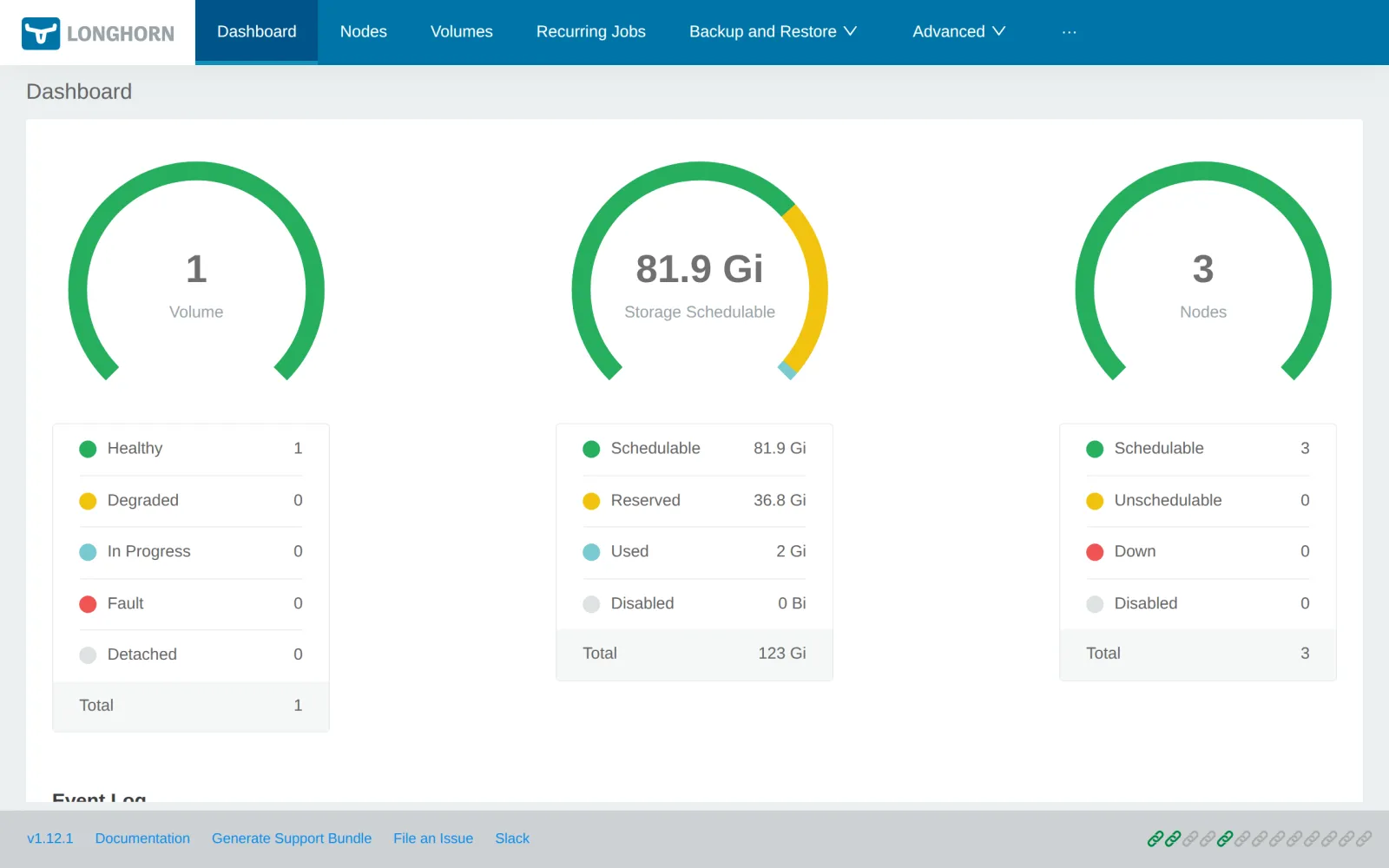
Longhorn erreichst du über Rancher, im Menü des Clusters unter
Longhorn:
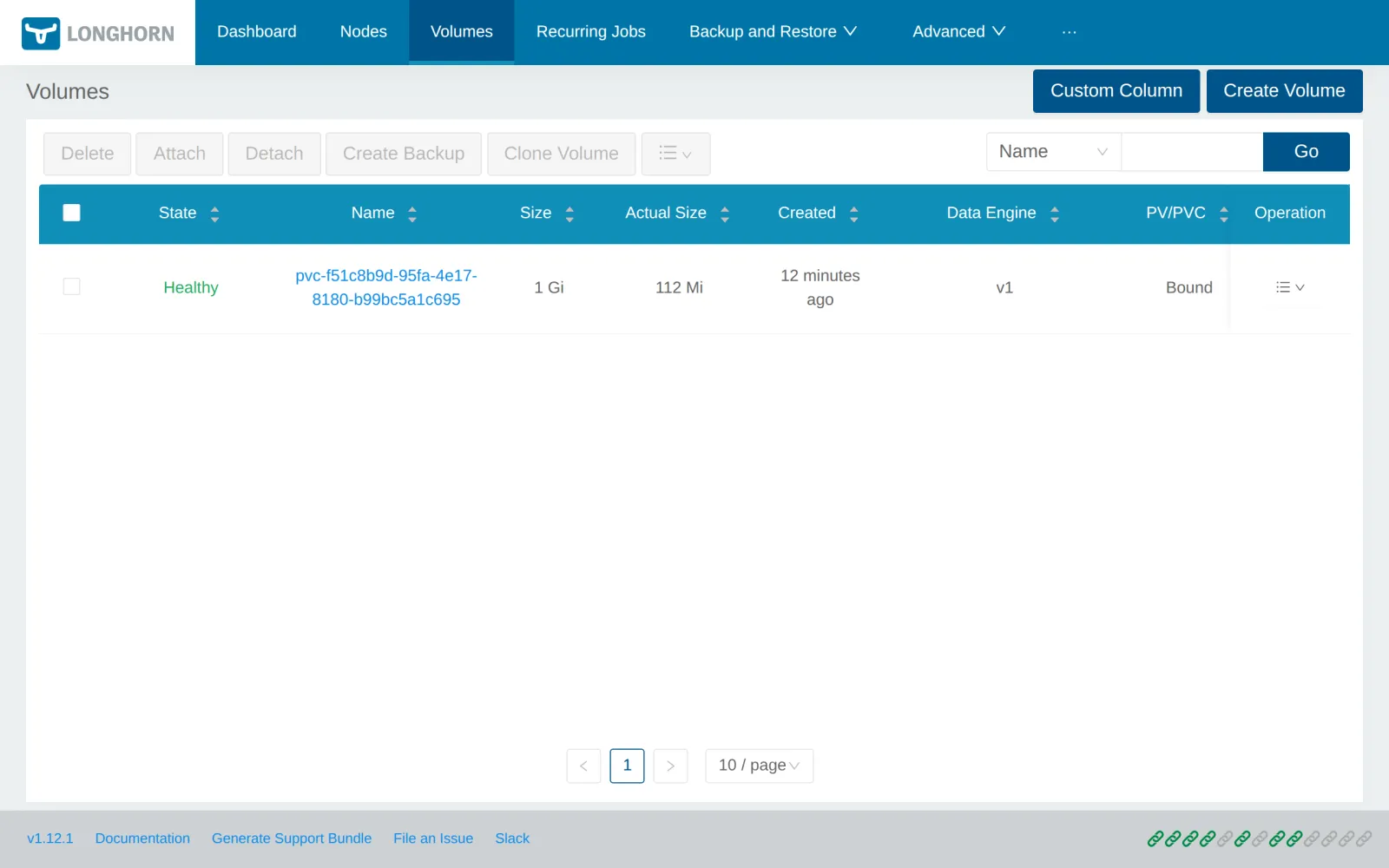
Unter Volumes steht das Volume von Postgres, 1 Gi groß, gut 100 Mi belegt:
Fortschritt speichern? Kostenlos registrieren
Drill 6: db-0 zieht um
Jetzt der Test aus dem Schwesterbuch, mit neuem Ausgang. Starte im zweiten Terminal die Messschleife:
while true; do
  printf '%s %s\n' "$(date +%T)" "$(curl -s -o /dev/null -m 2 -w '%{http_code}' \
    "http://notes.$WERK1.sslip.io/api/notes")"
  sleep 1
done
Sperre den Node von db-0 und wirf den Pod herunter:
N=$(kubectl -n notes get pod db-0 -o jsonpath='{.spec.nodeName}')
kubectl cordon "$N"
kubectl -n notes delete pod db-0
kubectl -n notes wait --for=condition=Ready pod/db-0 --timeout=300s
kubectl -n notes get pod db-0 -o wide
kubectl -n longhorn-system get volumes.longhorn.io "$V" -o custom-columns="$c"
kubectl uncordon "$N"
Erwartet (gekürzt):
node/werk1 cordoned
pod "db-0" deleted from notes namespace
pod/db-0 condition met
NAME   READY   STATUS    RESTARTS   AGE   IP   NODE    …
db-0   1/1     Running   0          50s   …    werk3   …
STATE      ROBUST    NODE    REPLICAS
attached   healthy   werk3   2
node/werk1 uncordoned
In der Messschleife:
… 200
… 500
…
… 500
… 200
db-0 läuft jetzt auf werk3, einem Node ganz ohne
Replika: Longhorn hängt das Volume über das Netz an. Nach knapp einer
Minute antwortet notes wieder. Die Pause kommt vom Neustart von Postgres
und davon, dass die api bei fehlender Datenbank neu startet („Kubernetes
zum Anfassen”, Tag 7). Mit local-path wäre db-0 bis zum
uncordon liegengeblieben.
Fortschritt speichern? Kostenlos registrieren
Kontrollpunkt
kubectl -n notes get pvc data-db-0 \
  -o custom-columns=NAME:.metadata.name,SC:.spec.storageClassName
Erwartet: das Volume von Postgres auf longhorn.
NAME        SC
data-db-0   longhorn
kubectl -n longhorn-system get volumes.longhorn.io "$V" -o custom-columns="$c"Erwartet: attached und healthy.
STATE      ROBUST    NODE    REPLICAS
attached   healthy   werk3   2
kubectl --kubeconfig "$LAB/kube/rancher.yaml" -n fleet-default \
get gitrepos.fleet.cattle.io notes \
-o jsonpath='{.status.display.readyBundleDeployments}'; echoErwartet: Fleet ist zufrieden, 2/2.
2/2Challenge
Zwei Replikas überstehen den Ausfall eines Nodes. Gib dem Volume eine
dritte, ohne etwas an notes zu ändern, und miss, wie lange Longhorn bis
healthy braucht.
Hinweis: Die Zahl steht im Volume-Objekt in
spec.numberOfReplicas.
Lösung
kubectl -n longhorn-system patch volumes.longhorn.io "$V" --type merge \
  -p '{"spec":{"numberOfReplicas":3}}'
kubectl -n longhorn-system get volumes.longhorn.io "$V" -o custom-columns="$c"
kubectl -n longhorn-system wait volumes.longhorn.io/"$V" \
  --for=jsonpath='{.status.robustness}'=healthy --timeout=120s
kubectl -n longhorn-system get replicas.longhorn.io \
  -o custom-columns=NODE:.spec.nodeID,STATE:.status.currentState
Erwartet (gekürzt):
volume.longhorn.io/pvc-f51c8b9d-95fa-4e17-8180-b99bc5a1c695 patched
STATE      ROBUST     NODE    REPLICAS
attached   degraded   werk3   3
volume.longhorn.io/pvc-f51c8b9d-95fa-4e17-8180-b99bc5a1c695 condition met
NODE    STATE
werk1   running
werk3   running
werk2   running
Mit der neuen Sollzahl ist das Volume kurz degraded, bis
Longhorn die dritte Replika aufgebaut hat. Bei 100 Mi Daten dauert das
gut zehn Sekunden. Die Änderung gilt nur für dieses Volume; neue Volumes
bekommen weiter die zwei aus der StorageClass.
Fortschritt speichern? Kostenlos registrieren
Enterprise-Notiz
- Datenbanken: Longhorn macht das Volume ausfallsicher, nicht Postgres. Ein Operator wie CloudNativePG mit Repliken auf Datenbank-Ebene ist schneller und vermeidet die Minute Pause.
- Platten: In Produktion bekommt Longhorn eigene
Platten pro Node (
/var/lib/longhornauf einem eigenen Dateisystem) und ein schnelles Netz. - Backups: Longhorn sichert Volumes per Backup-Target auf S3 oder NFS, außerhalb des Clusters, und stellt sie auch in einem anderen Cluster wieder her.
- Node-Ausfall: Bei hart abgestürzten Nodes greift
die Einstellung
node-down-pod-deletion-policy; ohne sie wartet Kubernetes die fünf Minuten aus dem Schwesterbuch, bevor das Volume woanders hin darf. - Alternativen: Ceph über Rook, ein SAN mit CSI-Treiber oder der Speicher der Cloud. Longhorn punktet mit einfacher Bedienung und der Integration in Rancher.