Tag 3: mTLS und Identität
Ziel: Du weist auf dem Draht nach, dass
web → notes-apiundnotes-api → postgresverschlüsselt sind, liest das Zertifikat eines Proxys und weißt, wo das Mesh noch Klartext annimmt. · Dauer: ca. 60 min · Voraussetzung: Tag 2
Briefing
- Jeder Proxy holt sich beim Start ein Zertifikat von
linkerd-identity. Der Name darin ist der ServiceAccount:<sa>.<namespace>.serviceaccount.identity.linkerd.cluster.local. - Das Zertifikat gilt 24 Stunden. Der Proxy erneuert es selbst, lange vor Ablauf.
- Zwischen zwei Proxys läuft immer mTLS – ohne Änderung an der App. Der Client-Proxy spricht dabei den Inbound-Port 4143 des Ziel-Proxys an, nicht den App-Port.
- Nur der Weg im Pod (Proxy ↔︎ App über
lo) ist Klartext. Der verlässt den Pod nie. - Linkerd nimmt Verbindungen ohne Proxy weiterhin an. Das Mesh verschlüsselt, es sperrt noch nichts ab.
 web-Pod                                 notes-api-Pod
 ┌───────────────────┐   mTLS :4143      ┌─────────────────────────┐
 │ nginx ─lo─> proxy │ ════════════════> │ proxy ─lo:8080─> app    │
 └───────────────────┘                   └─────────────────────────┘
 tag03/ohne (kein Proxy) ── Klartext :8080 ──> wird angenommen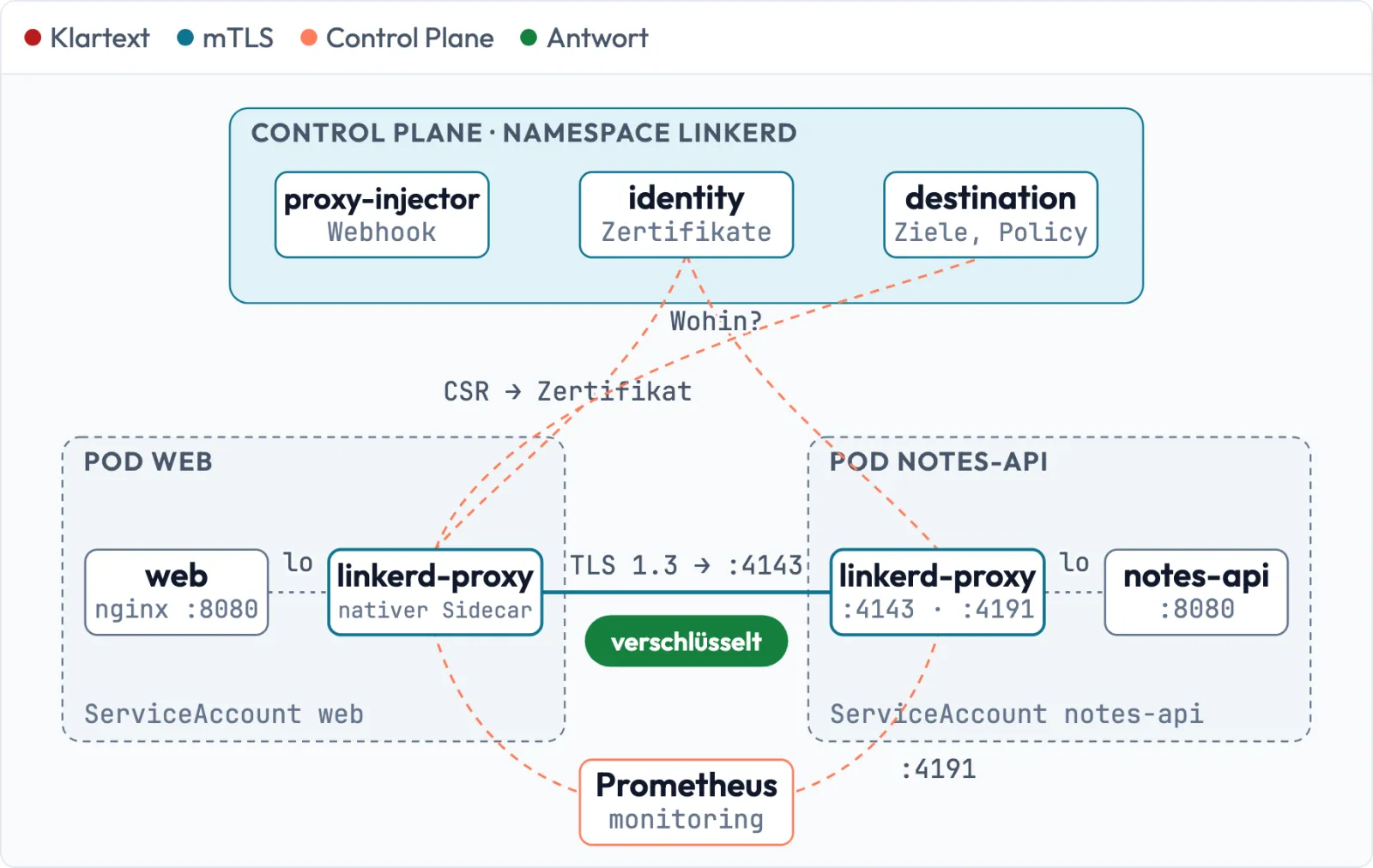
Drill 1: Die Identität eines Proxys
mkdir -p ~/linkerd/tag03 && cd ~/linkerd/tag03
linkerd identity -n notes -l app=web | grep -E 'POD|Issuer|Not |Subject:|DNS:'
Erwartet (gekürzt):
POD web-5cc48998cb-d4mnb (1 of 2)
        Issuer: CN=identity.linkerd.
            Not Before: Nov 19 15:14:50 2026 UTC
            Not After : Nov 20 15:15:30 2026 UTC
        Subject: CN=web.notes.serviceaccount.identity.linkerd.cluster.local
                DNS:web.notes.serviceaccount.identity.linkerd.cluster.local
...
linkerd identity öffnet einen Port-Forward zum Proxy und
zeigt das Zertifikat, das er gerade benutzt. Die Identität steht als
DNS-Name im Subject Alternative Name. Der Name ist kein echter
DNS-Eintrag, nur ein eindeutiger Bezeichner. Pods bekommen keine
SPIFFE-URI, die vergibt Linkerd nur an externe Workloads außerhalb von
Kubernetes.
Wer hat das Zertifikat ausgestellt? Beide Seiten protokollieren es:
kubectl -n notes logs deploy/web -c linkerd-proxy | grep 'Certified identity'
kubectl -n linkerd logs deploy/linkerd-identity -c identity | grep issued | tail -1
Erwartet (gekürzt):
INFO ThreadId(02) daemon:identity: linkerd_app: Certified identity id=web.notes.serv...
level=info msg="issued certificate for notes-api.notes.serviceaccount.identity.link...
  until 2026-11-20 15:27:53 +0000 UTC: 6671c3119c3d96cdf70755f8397a0440bba2b8d7b..."
Der Proxy erzeugt seinen Schlüssel selbst, schickt nur einen CSR samt
ServiceAccount-Token an identity und bekommt das signierte
Zertifikat zurück. Der private Schlüssel verlässt den Pod nie.
Fortschritt speichern? Kostenlos registrieren
Drill 2: Laufzeit und Erneuerung
kubectl -n linkerd get configmap linkerd-config -o jsonpath='{.data.values}' \
  | grep -E 'issuanceLifetime|clockSkewAllowance'
linkerd diagnostics proxy-metrics -n notes deploy/web | grep '^control_identity_cert'
date +%s
Erwartet (gekürzt):
    clockSkewAllowance: 20s
    issuanceLifetime: 24h0m0s
control_identity_cert_expiration_timestamp_seconds 1795187730.0
control_identity_cert_refresh_timestamp_seconds 1795101310.6312726
control_identity_cert_refreshes_total{result="error"} 0
control_identity_cert_refreshes_total{result="ok"} 1
...
1795102084
Ablauf minus jetzt: 85 646 Sekunden, also knapp 24 Stunden.
Not Before liegt 20 Sekunden in der Vergangenheit – das ist
die erlaubte Uhrenabweichung. Der Zähler
refreshes_total{result="ok"} wächst bei jeder Erneuerung,
result="error" darf nie steigen. Genau diese Metrik
überwachst du an Tag 4.
Achtung: Die Proxy-Zertifikate erneuern sich selbst, der Issuer darüber nicht. Läuft er ab, bekommen neue Pods keine Identität mehr. Darum geht es an Tag 5.
Fortschritt speichern? Kostenlos registrieren
Drill 3: Ein Abhörposten im Pod
Ein Ephemeral Container teilt sich das Netz mit dem Pod. Mit
--profile=netadmin bekommt er die Rechte für
tcpdump. Das Image nicolaka/netshoot gibt es
für amd64 und arm64; es ist gut 200 MB groß, der erste Start dauert.
kubectl -n notes get pods -o custom-columns=NAME:.metadata.name,IP:.status.podIP
P=$(kubectl -n notes get pod -l app=notes-api -o jsonpath='{.items[0].metadata.name}')
kubectl -n notes debug $P --image=docker.io/nicolaka/netshoot:v0.15 \
  --profile=netadmin -c sniff -- sleep 1800
kubectl -n notes wait pod/$P --timeout=120s \
  --for=jsonpath='{.status.ephemeralContainerStatuses[0].state.running}'
kubectl -n notes exec $P -c sniff -- \
  tcpdump -i eth0 -nn -q -c 12 'tcp and not port 4191' 2>/dev/null
Erwartet (gekürzt):
NAME                         IP
...
notes-api-79585895b4-dlzk5   10.0.1.2
web-5cc48998cb-d4mnb         10.0.1.1
web-5cc48998cb-h5wfc         10.0.2.24
pod/notes-api-79585895b4-dlzk5 condition met
15:28:16.908969 IP 10.0.2.24.33092 > 10.0.1.2.4143: tcp 0
15:28:16.909066 IP 10.0.1.2.4143 > 10.0.2.24.33092: tcp 0
15:28:16.911686 IP 10.0.2.24.33092 > 10.0.1.2.4143: tcp 1512
15:28:16.913440 IP 10.0.1.2.4143 > 10.0.2.24.33092: tcp 2376
...
Der Verkehr von web kommt auf Port 4143
an, nicht auf 8080. Port 4191 ist der Admin-Port des Proxys (Probes,
Metriken) – den blendest du aus.
Tipp:
kubectl debugwill einen Pod, kein Deployment (deploy/notes-apimeldet „not supported by debug“). Ein Ephemeral Container lässt sich nicht entfernen; er bleibt bis zum nächsten Neustart des Pods in der Spec stehen.
Fortschritt speichern? Kostenlos registrieren
Drill 4: Klartext gegen mTLS
Erst die Gegenprobe im eigenen Pod: Auf lo reicht der
Proxy den Request an die App weiter.
kubectl -n notes exec $P -c sniff -- timeout 10 \
  tcpdump -i eth0 -nn -A 'tcp port 4143' 2>/dev/null | grep -c 'lab-key'
kubectl -n notes exec $P -c sniff -- timeout 10 \
  tcpdump -i lo -nn -A 'tcp port 8080' 2>/dev/null | grep -i -m1 'api-key'
Erwartet:
0
x-api-key: lab-key-123
Auf dem Netz kein API-Key, im Pod lesbar. Nun zwei Clients in einem eigenen Namespace, einer ohne und einer mit Proxy:
kubectl create namespace tag03
cat > clients.yaml <<'EOF'
apiVersion: v1
kind: Pod
metadata: {name: ohne, namespace: tag03}
spec:
  containers:
  - name: curl
    image: docker.io/curlimages/curl:8.23.0
    command: [sleep, "86400"]
---
apiVersion: v1
kind: Pod
metadata:
  name: mit
  namespace: tag03
  annotations: {linkerd.io/inject: enabled}
spec:
  containers:
  - name: curl
    image: docker.io/curlimages/curl:8.23.0
    command: [sleep, "86400"]
EOF
kubectl apply -f clients.yaml
kubectl -n tag03 wait pod --all --for=condition=Ready --timeout=120s
Erwartet (gekürzt):
pod/mit condition met
pod/ohne condition met
Beide rufen denselben Pod direkt an, während tcpdump 20
Sekunden mitschneidet:
IP=$(kubectl -n notes get pod $P -o jsonpath='{.status.podIP}')
MIT=$(kubectl -n tag03 get pod mit -o jsonpath='{.status.podIP}')
kubectl -n notes exec $P -c sniff -- timeout 20 tcpdump -i eth0 -nn -A \
  'tcp port 8080 or tcp port 4143' > cap.txt 2>/dev/null &
sleep 3
for c in ohne mit; do
  kubectl -n tag03 exec $c -c curl -- curl -s -o /dev/null -w "$c %{http_code}\n" \
    -H 'X-API-Key: lab-key-123' http://$IP:8080/notes
done
wait
grep -a -E 'HTTP: GET|lab-key' cap.txt | cut -c1-62
grep -a -c "IP $MIT.* > $IP.4143" cap.txt
Erwartet:
ohne 200
mit 200
15:29:14.872048 IP 10.0.1.225.57378 > 10.0.1.2.8080: Flags [P.
X-API-Key: lab-key-123
15:29:19.639287 IP 10.0.1.116.33186 > 10.0.1.2.8080: Flags [P.
15:29:29.638323 IP 10.0.1.116.45132 > 10.0.1.2.8080: Flags [P.
19
Beide bekommen 200. ohne (10.0.1.225)
schickt den API-Key lesbar über das Netz, mit taucht nur
mit 19 verschlüsselten Paketen auf Port 4143 auf. Die Zeilen von
10.0.1.116 sind die Readiness-Probes des Kubelets vom Node – auch sie
sind Klartext.
Fortschritt speichern? Kostenlos registrieren
Drill 5: Der Handshake
Im Handshake steht, wen der Client erwartet. tshark
liest das mit:
kubectl -n notes exec $P -c sniff -- timeout 15 tshark -i eth0 -f 'tcp port 4143' \
  -Y tls.handshake -T fields -e ip.src -e tls.handshake.type \
  -e tls.handshake.extensions_server_name \
  -e tls.handshake.extensions.supported_version \
  > tls.txt 2>/dev/null &
sleep 5
kubectl -n tag03 exec mit -c curl -- curl -s -o /dev/null -w "%{http_code}\n" \
  -H 'X-API-Key: lab-key-123' http://$IP:8080/notes
wait
cat tls.txt
Erwartet (Reihenfolge und IPs schwanken):
200
10.0.1.254  1  notes-api.notes.serviceaccount.identity.linkerd.cluster.local  0x0304
10.0.1.2    2                                                                 0x0304
Typ 1 ist das ClientHello des Proxys von mit, Typ 2 die
Antwort von notes-api. Als SNI schickt der Client die
Identität, die er erwartet – die hat ihm
linkerd-destination genannt. 0x0304 ist TLS
1.3. Meldet sich am Ziel ein Proxy mit einer anderen Identität, bricht
der Client ab.
Siehst du nichts, nutzt der Proxy noch eine offene Verbindung. Warte 30 Sekunden und wiederhole den Drill.
Fortschritt speichern? Kostenlos registrieren
Drill 6: Auch Postgres
notes-api spricht Postgres ohne TLS
(sslmode=disable). Prüfe, was auf dem Draht ankommt – mit
einem zweiten Abhörposten und einem psql ohne Proxy als
Gegenprobe:
kubectl -n notes debug postgres-0 --image=docker.io/nicolaka/netshoot:v0.15 \
  --profile=netadmin -c sniff -- sleep 1800
kubectl -n tag03 run psql --image=docker.io/library/postgres:18.7-alpine \
  --env=PGPASSWORD=lab-db-123 --command -- sleep 86400
kubectl -n tag03 wait pod/psql --for=condition=Ready --timeout=120s
kubectl -n notes wait pod/postgres-0 --timeout=120s \
  --for=jsonpath='{.status.ephemeralContainerStatuses[0].state.running}'
kubectl -n notes exec postgres-0 -c sniff -- timeout 20 tcpdump -i eth0 -nn -A \
  'tcp port 5432 or tcp port 4143' > pg.txt 2>/dev/null &
sleep 3
kubectl -n tag03 exec psql -- psql -h postgres.notes -U notes -d notes \
  -c 'select count(*) from notes'
wait
grep -a -c '4143' pg.txt
grep -a -o 'select count.*notes' pg.txt
grep -a -c -i 'from notes' pg.txt
Erwartet:
 count
-------
     1
(1 row)

171
select count(*) from notes
1
Die Abfragen von notes-api laufen verschlüsselt über
4143 – kein einziges FROM notes im Klartext. Die eine
Fundstelle ist die Abfrage aus tag03/psql, die ungeschützt
über 5432 lief. Für Postgres als Opaque Port (Tag 2) gilt also dasselbe
wie für HTTP: Der Proxy verschlüsselt den TCP-Strom, ohne ihn zu
verstehen.
Fortschritt speichern? Kostenlos registrieren
Drill 7: Die Proxys zählen mit
Ohne Mitschnitt geht es auch: Jeder Proxy zählt eingehende Verbindungen mit der Identität des Clients.
linkerd diagnostics proxy-metrics -n notes pod/$P \
  | grep '^tcp_open_total{direction="inbound",peer="src"' \
  | grep -oE '(target_port|client_id|no_tls_reason)="[^"]*"|[0-9]+$' | paste - - -
linkerd diagnostics proxy-metrics -n notes pod/postgres-0 \
  | grep '^tcp_open_total{direction="inbound",peer="src"' \
  | grep -oE '(target_port|client_id|no_tls_reason)="[^"]*"|[0-9]+$' | paste - - -
Erwartet (gekürzt, Zahlen schwanken):
target_port="8080"  client_id="web.notes.serviceaccount.identity.linkerd.c…"     19
target_port="8080"  client_id="default.tag03.serviceaccount.identity.linkerd…"   4
target_port="4191"  no_tls_reason="no_tls_from_remote"                           71
target_port="8080"  no_tls_reason="no_tls_from_remote"                           32
target_port="5432"  client_id="notes-api.notes.serviceaccount.identity.linke…"   9
target_port="5432"  no_tls_reason="port_skipped"                                 1
target_port="4191" no_tls_reason="no_tls_from_remote" 65client_id= mTLS, mit der Identität des Gegenübers.mitheißtdefault.tag03– er nutzt den ServiceAccountdefault.no_tls_from_remote= Klartext: Kubelet-Probes undtag03/ohne.port_skipped= Klartext auf einem Opaque Port, hierpsqlaustag03.
Alle drei Klartext-Fälle wurden angenommen. Linkerds
Standard-Policy heißt all-unauthenticated. Wie du das auf
„nur mTLS, nur bestimmte Identitäten“ umstellst, zeigt Tag 6.
Fortschritt speichern? Kostenlos registrieren
Übung: Speed-Drills
- Zeig die Identität des Proxys von
postgres-0aus seinem Log. Zeitziel: 20 s - Zeig, wann die Zertifikate der
helper-Pods ablaufen. Zeitziel: 20 s - Zähl, wie viele Zertifikate
linkerd-identityseit dem Start ausgestellt hat. Zeitziel: 20 s - Zeig, welche Pods in
noteseinen Ephemeral Container haben. Zeitziel: 40 s
Lösung
kubectl -n notes logs postgres-0 -c linkerd-proxy | grep 'Certified identity'
linkerd identity -n notes -l app=helper | grep 'Not After'
kubectl -n linkerd logs deploy/linkerd-identity -c identity | grep -c issued
kubectl -n notes get pods -o \
  custom-columns=NAME:.metadata.name,DEBUG:.spec.ephemeralContainers[*].name
Erwartet (Auszug für 2 und 4):
            Not After : Nov 20 15:15:30 2026 UTC
            Not After : Nov 20 15:15:37 2026 UTC
NAME                         DEBUG
helper-76b4db44b6-2xlc5      <none>
...
notes-api-79585895b4-dlzk5   sniff
postgres-0                   sniff
Fortschritt speichern? Kostenlos registrieren
Kontrollpunkt
linkerd identity -n notes -l app=notes-api | grep -c 'Subject: CN=notes-api.notes'Erwartet: 2
linkerd diagnostics proxy-metrics -n notes pod/postgres-0 \
  | grep '^tcp_open_total' | grep -c 'client_id="notes-api.notes'
Erwartet: 1 – Postgres sieht
notes-api mit mTLS.
kubectl -n tag03 exec ohne -- curl -s -o /dev/null -w '%{http_code}\n' \
  http://web.notes/
Erwartet: 200 – Klartext von außerhalb
des Mesh wird (noch) angenommen.
Challenge
Weise ohne tcpdump nach, dass auch
web → helper per mTLS läuft. Erkläre außerdem, woher die
Klartext-Verbindungen auf Port 8080 von helper stammen.
Hinweis: Schau in die Spec von helper,
nicht in den Lastgenerator.
Lösung
linkerd diagnostics proxy-metrics -n notes deploy/helper \
  | grep '^tcp_open_total{direction="inbound",peer="src"' \
  | grep -oE '(target_port|client_id|no_tls_reason)="[^"]*"|[0-9]+$' | paste - - -
kubectl -n notes get deploy helper \
  -o jsonpath='{.spec.template.spec.containers[0].readinessProbe}{"\n"}'
Erwartet (gekürzt, für beide Pods):
target_port="8080"  client_id="web.notes.serviceaccount.identity.linkerd.c…"     54
target_port="8080"  no_tls_reason="no_tls_from_remote"                          105
target_port="4191"  no_tls_reason="no_tls_from_remote"                          210
...
{"failureThreshold":3,"httpGet":{"path":"/status/200","port":"http","scheme":...
web kommt mit Identität, also mTLS. Der Klartext auf
8080 ist die Readiness-Probe: Das Kubelet läuft auf dem Node ohne Proxy.
Linkerd lässt Probes durch – auch dann noch, wenn du an Tag 6 alles
andere sperrst.
Fortschritt speichern? Kostenlos registrieren
Aufräumen
kubectl delete namespace tag03
kubectl -n notes rollout restart deploy/notes-api
kubectl -n notes rollout status deploy/notes-api --timeout=180s
Der Neustart entfernt den Ephemeral Container aus
notes-api. In postgres-0 beendet er sich nach
30 Minuten selbst; der Eintrag verschwindet beim nächsten Neustart (Tag
4).
Interview-Notiz
- Wie weist du nach, dass Linkerd verschlüsselt? Mitschnitt
auf dem Pod-Interface: Verkehr auf 4143, TLS 1.3, SNI = erwartete
Identität; dazu
client_idin den Proxy-Metriken. - Woher kommt die Identität und wie lange gilt sie? Aus dem
ServiceAccount-Token;
linkerd-identitysigniert den CSR des Proxys, Laufzeit 24 h, Erneuerung automatisch. - Ist ein Dienst im Mesh abgeschottet? Nein. Standard ist
all-unauthenticated, Klartext ohne Proxy wird angenommen. Erst Policies sperren.
Enterprise-Notiz
- Audits wollen Belege: Proxy-Metriken mit
tls/client_idexportieren statt einmaliger Mitschnitte. kubectl debug --profile=netadminist mächtig – per RBAC (pods/ephemeralcontainers) und Pod Security begrenzen.- Linkerd verschlüsselt nur zwischen Proxys. Für Compliance „Verschlüsselung bis in die Datenbank“ prüfen, ob auch Jobs, Backups und Admin-Zugriffe im Mesh laufen.
- Für Postgres-Zugriffe von außerhalb (Admins, Migrationen per
Pipeline) bleibt
sslmode=verify-fullnötig – das Mesh deckt nur das Mesh ab.