Tag 5: Mapper, Scopes, Audience
Ziel: Mit Client Scopes und Mappern bestimmen, was in einem Token steht: eine Audience für notes-api, Gruppen auf Anfrage, ein eigenes Attribut. Und notes-api die Audience prüfen lassen. · Dauer: ca. 75 min · Voraussetzung: Tag 4
Briefing
- Ein Protocol Mapper schreibt einen Claim ins Token: Rollen, Gruppen, Attribute, eine Audience.
- Client Scopes bündeln Mapper.
Default Scopes landen immer im Token,
Optional Scopes nur, wenn der Client sie mit
scope=…anfragt. - Die Audience (
aud) sagt, für wen ein Token gedacht ist. Eine API sollte nur Tokens annehmen, die für sie ausgestellt sind. - Eigene Attribute müssen in Keycloak 26 im User Profile stehen, sonst verwirft Keycloak sie.
 Client notes-web ── Default Scope notes-api ── Mapper aud-notes-api → "aud":["notes-api"]
                                            └─ Mapper abteilung     → "abteilung":"…"
 Client notes-cli ── Optional Scope groups ──── Mapper groups        → "groups":[…]
Drill 1: Ein Client für die API
source ~/kc-lab/setup/env.sh
mkdir -p ~/kc-lab/tag05 && cd ~/kc-lab/tag05
kclogin
OIDC=$KC_URL/realms/lab/protocol/openid-connect
cid() { kcadm get clients -r lab -q clientId=$1 --fields id --format csv --noquotes; }
uid() { kcadm get users -r lab -q username=$1 -q exact=true --fields id \
  --format csv --noquotes; }
kcadm create clients -r lab -s clientId=notes-api -s enabled=true \
  -s publicClient=false -s secret=lab-client-secret-123 \
  -s standardFlowEnabled=false -s directAccessGrantsEnabled=false \
  -s serviceAccountsEnabled=false
Erwartet (gekürzt):
Logging into http://localhost:8080 as user kcadmin of realm master
Created new client with id 'ac5cd1fe-…'
Ein Client ohne jeden Flow: Er holt sich nie ein Token. Er steht für die API selbst, als Name für die Audience und mit eigenem Secret für die Introspection.
Fortschritt speichern? Kostenlos registrieren
Drill 2: Ein Scope mit Audience
kcadm create client-scopes -r lab -s name=notes-api -s protocol=openid-connect \
  -s 'attributes."include.in.token.scope"=true'
SID=$(kcadm get client-scopes -r lab --fields id,name --format csv --noquotes \
  | grep ',notes-api$' | cut -d, -f1)
kcadm create client-scopes/$SID/protocol-mappers/models -r lab -s name=aud-notes-api \
  -s protocol=openid-connect -s protocolMapper=oidc-audience-mapper \
  -s 'config."included.client.audience"=notes-api' \
  -s 'config."access.token.claim"=true' -s 'config."introspection.token.claim"=true'
for c in notes-web notes-cli; do
  kcadm update clients/$(cid $c)/default-client-scopes/$SID -r lab && echo "$c ok"
done
jwt "$(token)" | jq -c '{aud, scope}'
Erwartet (gekürzt):
Created new client-scope with id '6acd9b68-…'
Created new model with id '6a2742d0-…'
notes-web ok
notes-cli ok
{"aud":["notes-api","account"],"scope":"openid profile notes-api email"}
Der Scope ist für beide Clients Default, also steht
notes-api jetzt in jedem ihrer Tokens.
Fortschritt speichern? Kostenlos registrieren
Drill 3: Introspection, zweiter Versuch
In Tag 3 hat Keycloak die Introspection abgelehnt, weil der fragende Client nicht in der Audience stand. Jetzt fragt die API selbst:
T=$(token)
curl -s -u notes-cli:lab-client-secret-123 -d token=$T $OIDC/token/introspect \
  | jq -c '{active}'
curl -s -u notes-api:lab-client-secret-123 -d token=$T $OIDC/token/introspect \
  | jq -c '{active, username, client_id, aud}'
Erwartet:
{"active":false}
{"active":true,"username":"anna","client_id":"notes-cli","aud":["notes-api","account"]}
notes-cli darf das Token nicht prüfen,
notes-api schon, denn das Token ist für sie bestimmt. Genau
so soll es sein: Wer ein Token benutzt, ist nicht automatisch der, der
es bewerten darf.
Fortschritt speichern? Kostenlos registrieren
Drill 4: notes-api verlangt ihre Audience
compose.yaml von notes reicht
NOTES_AUDIENCE an notes-api weiter. Setz sie:
echo 'export NOTES_AUDIENCE=notes-api' >> ~/kc-lab/setup/vms.env
source ~/kc-lab/setup/env.sh
cd ~/kc-lab/notes && docker compose up -d --wait notes-api
docker compose logs notes-api 2>&1 | grep -o 'audience=[a-z-]*' | tail -1
api() { docker run --rm --network lab curlimages/curl:8.17.0 -s "$@"; }
F=$(curl -s -d grant_type=password -d client_id=admin-cli -d username=anna \
  -d password=lab-user-pw-123 $OIDC/token | jq -r .access_token)
jwt "$F" | jq -c '{aud, azp}'
api -w ' %{http_code}\n' -H "Authorization: Bearer $F" notes-api:8080/whoami
api -o /dev/null -w '%{http_code}\n' -H "Authorization: Bearer $(token)" \
  notes-api:8080/whoami
Erwartet (gekürzt):
 Container notes-notes-api-1 Healthy
audience=notes-api
{"aud":null,"azp":"admin-cli"}
{"error":"Audience \"notes-api\" fehlt"}
 401
200
admin-cli gibt es in jedem Realm. Sein Token ist echt,
gültig und von anna, aber nicht für notes-api bestimmt. Ohne Prüfung der
Audience hätte notes-api es angenommen.
Fortschritt speichern? Kostenlos registrieren
Drill 5: Gruppen auf Anfrage
kcadm create client-scopes -r lab -s name=groups -s protocol=openid-connect
GID=$(kcadm get client-scopes -r lab --fields id,name --format csv --noquotes \
  | grep ',groups$' | cut -d, -f1)
kcadm create client-scopes/$GID/protocol-mappers/models -r lab -s name=groups \
  -s protocol=openid-connect -s protocolMapper=oidc-group-membership-mapper \
  -s 'config."claim.name"=groups' -s 'config."full.path"=false' \
  -s 'config."access.token.claim"=true' -s 'config."id.token.claim"=true' \
  -s 'config."userinfo.token.claim"=true'
kcadm update clients/$(cid notes-cli)/optional-client-scopes/$GID -r lab \
  && echo optional
jwt "$(token)" | jq -c '{groups}'
G=$(curl -s -d grant_type=password -d client_id=notes-cli \
  -d client_secret=lab-client-secret-123 -d username=anna -d password=lab-user-pw-123 \
  -d 'scope=openid groups' $OIDC/token | jq -r .access_token)
jwt "$G" | jq -c '{groups, scope}'
Erwartet (gekürzt):
Created new client-scope with id 'fd230c46-…'
Created new model with id '401da0eb-…'
optional
{"groups":null}
{"groups":["team-notes"],"scope":"openid groups profile notes-api email"}
Ohne scope=groups kein Claim. Optionale Scopes halten
Tokens klein und geben nur heraus, was ein Client ausdrücklich
braucht.
Fortschritt speichern? Kostenlos registrieren
Drill 6: Ein eigenes Attribut
anna arbeitet in der Entwicklung. Versuch es direkt:
kcadm update users/$(uid anna) -r lab -s 'attributes.abteilung=["Entwicklung"]'
kcadm get users/$(uid anna) -r lab | jq -c .attributes
kcadm get users/profile -r lab | jq -c '[.attributes[].name]'
Erwartet:
null
["username","email","firstName","lastName"]
Kein Fehler, aber auch kein Attribut. Das User Profile kennt nur vier Attribute; alles andere verwirft Keycloak stillschweigend. Ergänze das Profil:
kcadm get users/profile -r lab > profile.json
jq '.attributes += [{"name":"abteilung","displayName":"Abteilung","multivalued":false,
  "permissions":{"view":["admin","user"],"edit":["admin"]}}]' profile.json \
  > profile-neu.json
docker compose -f ~/kc-lab/keycloak/compose.yaml cp profile-neu.json \
  keycloak:/tmp/profile.json
kcadm update users/profile -r lab -f /tmp/profile.json && echo profil-ok
kcadm update users/$(uid anna) -r lab -s 'attributes.abteilung=["Entwicklung"]'
kcadm get users/$(uid anna) -r lab | jq -c .attributes
Erwartet (gekürzt):
 keycloak-keycloak-1 Copied profile-neu.json to keycloak-keycloak-1:/tmp/profile.json
profil-ok
{"abteilung":["Entwicklung"]}
kcadm läuft im Container, darum muss die Datei erst
hinein. anna darf ihre Abteilung sehen, ändern darf sie nur ein Admin.
Jetzt der Mapper ins Token, im Scope notes-api:
kcadm create client-scopes/$SID/protocol-mappers/models -r lab -s name=abteilung \
  -s protocol=openid-connect -s protocolMapper=oidc-usermodel-attribute-mapper \
  -s 'config."user.attribute"=abteilung' -s 'config."claim.name"=abteilung' \
  -s 'config."jsonType.label"=String' -s 'config."access.token.claim"=true' \
  -s 'config."id.token.claim"=true'
jwt "$(token)" | jq -c '{preferred_username, abteilung, aud}'
Erwartet (gekürzt):
Created new model with id 'ca3d1830-…'
{"preferred_username":"anna","abteilung":"Entwicklung","aud":["notes-api","account"]}
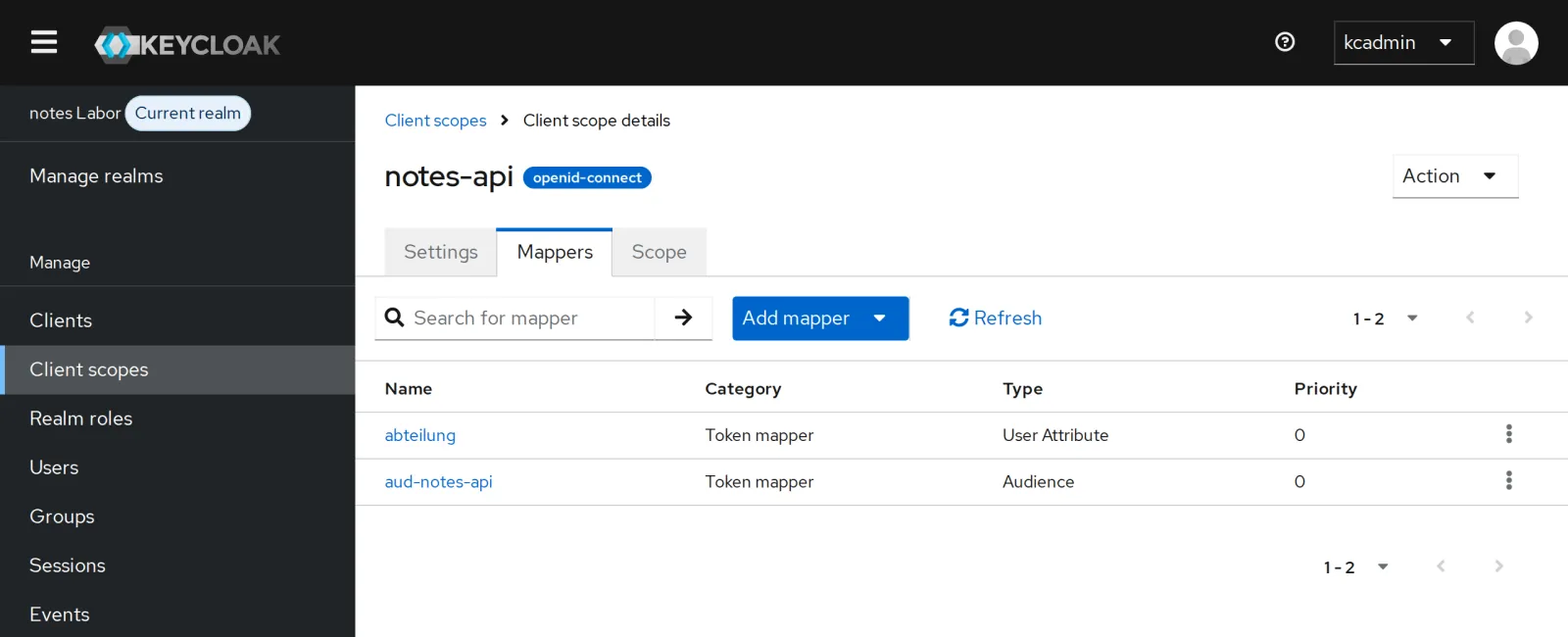
In der Konsole unter Client scopes, notes-api, Mappers stehen beide Mapper:
Fortschritt speichern? Kostenlos registrieren
Drill 7: Ein Token ansehen, ohne sich anzumelden
Was stünde in bens Token für notes-web? Keycloak kann es berechnen:
kcadm get clients/$(cid notes-web)/evaluate-scopes/generate-example-access-token \
  -r lab -q userId=$(uid ben) -q scope=openid \
  | jq -c '{preferred_username, aud, abteilung, roles: .realm_access.roles}'
Erwartet:
{"preferred_username":"ben","aud":["notes-api","account"],"abteilung":null,"roles":
["offline_access","notes-lesen","default-roles-lab","uma_authorization"]}
Dasselbe kann die Konsole unter Client scopes, Evaluate. Für die Fehlersuche ist das Gold wert: Du siehst ein Token, ohne bens Passwort zu kennen.
Fortschritt speichern? Kostenlos registrieren
Kontrollpunkt
jwt "$(token)" | jq -c .audErwartet: Tokens sind für notes-api bestimmt.
["notes-api","account"]api -o /dev/null -w '%{http_code}\n' -H "Authorization: Bearer $F" notes-api:8080/whoamiErwartet: Ein Token ohne diese Audience weist notes-api ab.
401jwt "$(token)" | jq -r .abteilungErwartet: das Attribut aus dem User Profile.
EntwicklungChallenge
notes-api soll eine eigene Rolle notes-api:archiv
kennen, die nur das Team hat. Leg sie als Client-Rolle
an, gib sie der Gruppe team-notes und finde sie im
Token.
Hinweis:
kcadm create clients/<id>/roles,
add-roles mit --cclientid; Client- Rollen
stehen unter resource_access.
Lösung
kcadm create clients/$(cid notes-api)/roles -r lab -s name=archiv
kcadm add-roles -r lab --gname team-notes --cclientid notes-api --rolename archiv
jwt "$(token)" | jq -c .resource_access
jwt "$(token ben lab-user-pw-456)" | jq -c .resource_access
Erwartet:
Created new role with id 'archiv'
{"account":{"roles":["manage-account","manage-account-links","view-profile"]},
"notes-api":{"roles":["archiv"]}}
{"account":{"roles":["manage-account","manage-account-links","view-profile"]}}
Realm-Rollen gelten für alle Anwendungen; Client-Rollen gehören einer Anwendung und liegen im Token unter ihrem Namen. Für Rechte, die nur eine API versteht, sind sie die bessere Wahl.
Fortschritt speichern? Kostenlos registrieren
Enterprise-Notiz
- Audience immer prüfen: Jede API prüft
aud. Sonst nimmt sie Tokens an, die für eine andere Anwendung ausgestellt wurden, auch von einem kompromittierten Client. - Kleine Tokens: Nur Default Scopes, die wirklich alle brauchen; der Rest als Optional. Tokens reisen bei jeder Anfrage mit, auch in Logs.
- Lightweight Access Tokens (Client-Einstellung) lassen fast alle Claims weg; die API holt sie per Introspection.
- User Profile ist die Stelle für Validierung, Pflichtfelder und Rechte an Attributen, auch für die Selbstregistrierung.